
Watercolor, Anime or Realistic? How to Choose a Greeting Style
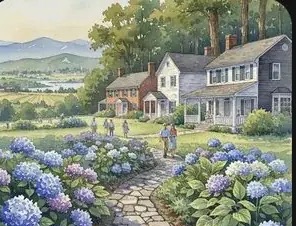
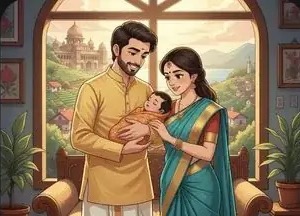
ShareGreet offers 11 visual styles: Realistic, Anime, 3D, Clay, Watercolor, Sketch, Oil painting, Vintage photo, Storybook, Comic book and Pop art. Picking the right one changes how the message feels.
A quick guide
| Style | Feels | Good for |
|---|---|---|
| Realistic | Cinematic, polished | Milestones, graduations, big birthdays |
| Watercolor | Soft, nostalgic | Parents, grandparents, get well |
| Storybook | Warm, gentle | New babies, children |
| Anime | Energetic, youthful | Friends, cousins, birthdays |
| Comic book | Playful | Siblings, jokes, roommates |
| Sketch | Quiet, intimate | Farewells |
| Vintage photo | Nostalgic | Anniversaries, family history |
| 3D and Clay | Cute, tactile | Kids, light-hearted greetings |
| Oil painting | Classic, rich | Formal or traditional occasions |
| Pop art | Bold, bright | Parties, fun announcements |
Match the style to the relationship
Ask what the recipient would find charming. A grandmother may prefer Watercolor, while a teenage cousin will like Anime or Pop art. When unsure, Realistic is a safe default.
Style by occasion
- Birthdays: Anime, Pop art or 3D for friends; Watercolor for parents.
- Festivals: Oil painting or Pop art for color; Storybook for nostalgia.
- New baby: Storybook, Watercolor or Clay.
- Farewell: Sketch or Vintage photo.
- Graduation: Realistic or Oil painting.
A simple way to decide
- Imagine the recipient opening the message. What would make them smile?
- Pick the style that matches that feeling, not the one that looks most impressive.
- If it feels wrong after you read the script, regenerate with a different style.
Consistency helps
If you send several greetings in one season, using the same style for the same person makes the messages feel like a series. Saving a default style in Settings is a quick way to do that.
Style and the age of the viewer
- Children: 3D, Clay, Comic book and Storybook are bright and easy to follow.
- Teenagers and young adults: Anime, Pop art and Comic book feel playful and current.
- Adults: Realistic, Oil painting and Vintage photo feel more grown-up.
- Elders: Watercolor, Storybook and Realistic are calm and clear, with less visual noise.
A note about people in generated images
The people you see in generated scenes are illustrations, not likenesses of anyone in particular. If you want a real face in the story, such as your grandmother or the new baby, upload a real photo for that scene while you review the script. A real photo next to illustrated scenes is often the most touching part.
Common pitfalls
- A style that overshadows the message. For a sincere thank-you, a very busy or loud style can distract from the words.
- Changing style every time. If you send greetings to the same person each year, a consistent style becomes your signature.
- Not previewing. Read the script first. If the tone does not match the style, change one of them before you generate.
How to test
You get free generations when you start, so you can try the same prompt in two styles and compare. Choose the one that feels more like the person you are sending it to.
Set a default
In Settings you can save a default visual style, so every new story starts with it. See Photo mode vs Movie mode for how scenes are produced.
Frequently asked questions
How many styles are there?
11: Realistic, Anime, 3D, Clay, Watercolor, Sketch, Oil painting, Vintage photo, Storybook, Comic book and Pop art.
Can I change the style after creating a story?
You choose the style before generating. To try another, create the story again.
More articles
- Greet My Circle: Send Every Festival Wish in One Minute, in Everyone's Language
- AI Video Styles: 37 Looks From Realistic and Anime to Clay and Watercolour
- AI Video Prompt Builder: Write a Better Prompt for Any Video Tool
- Which AI Video Tool Should I Use? A Simple Guide to Every ShareGreet Video Maker
- Replace a Character in a Video With AI: Swap a Person for a Pet, Toy or Cartoon