
How to Make a Birthday Video Message for Your Mom

A card says happy birthday. A message that mentions her filter coffee, the way she hums while cooking, and the year she stayed up to finish your school project says I notice you. That difference is what makes a mom replay a birthday message instead of just liking it.
Here is a simple way to make a personal birthday video message for your mom in a few minutes, even if you have never edited a video.
Start with three specific details
Before you open any app, write down three things that are only true of her. Not “she is kind” but “she saves the last gulab jamun for me.” Specific details are the raw material for any good greeting, whether you write it yourself or have AI draft it.
- A habit: how she answers the phone, her morning tea, the song she sings off-key.
- A memory: one small scene, such as a train journey, a monsoon evening or a school morning.
- A thank you: one thing she did that you only understood years later.
Write the prompt like you speak
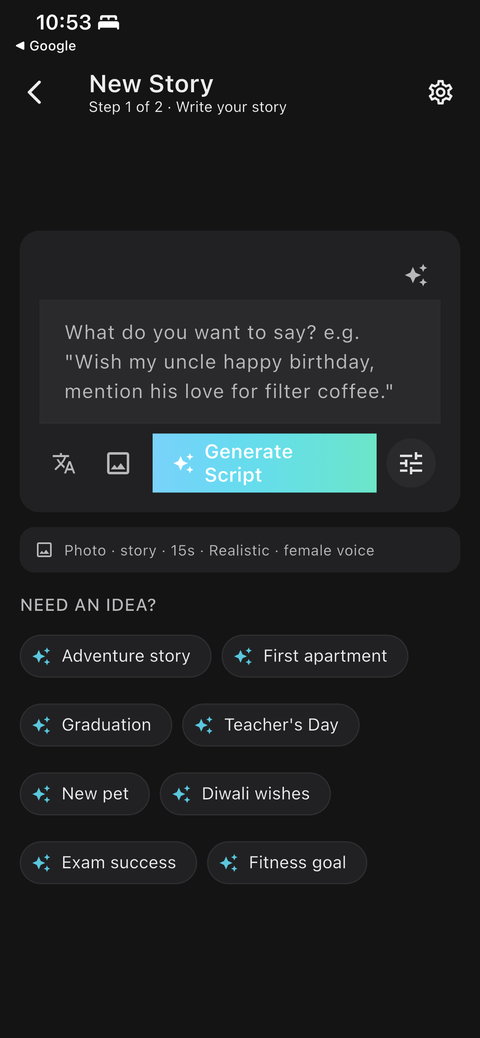
In ShareGreet you describe what you want to say in a sentence or two. Plain language works best. For example:
Wish my mom a happy birthday. Mention her filter coffee at 6 a.m. and how she still calls me beta no matter how old I get. Thank her for never missing a school event.
ShareGreet turns that into a short story, writes the script, illustrates each scene and narrates it. You can read and edit the script before anything is generated, so nothing goes out that does not sound like you.
Pick her language, not yours
If your mom thinks and dreams in Marathi, Tamil, Bengali or Gujarati, a narration in that language lands very differently from English. ShareGreet narrates in 30+ regional languages, so you can choose the one she actually speaks at home. See our guide to Hindi greetings or greetings in South Indian languages for phrasing ideas.
Choose a style that fits her
Watercolor and Storybook feel warm and nostalgic. Realistic looks cinematic. If you are not sure, read how to choose a visual style.
Add a real photo if you have one
In the script review step you can upload your own photo or short video for any scene. A real picture of the two of you next to an illustrated scene is often the moment that gets the tears.
Three prompt variations to try
If you are not sure how to phrase it, start from one of these and swap in your own details:
- Sentimental: “Tell my mom happy birthday. Say that every good habit I have came from watching her, and that I wish I could be at the table with her today.”
- Funny: “Wish my mom happy birthday and tease her about how she still hides the good biscuits. Say we all know where they are.”
- Long distance: “Wish my mom happy birthday from another country. Say I miss her cooking, and that I will call at six in the morning her time.”
Common mistakes to avoid
- Too many ideas. One strong memory beats five weak ones. Keep the story focused on a single moment.
- Generic adjectives. “Kind, loving, caring” could describe anyone. Replace them with something she actually does.
- Sending it late. A birthday message that arrives at 9 p.m. feels like an afterthought. Schedule your day so it is the first thing she sees.
- Skipping the review. Always read the generated script. If a line does not sound like you, edit it before generating.
A simple timeline for the day
- The day before: write your prompt and generate the story. It runs in the background and you get a notification when it is ready.
- Check it: watch it once yourself, ideally with the sound on.
- Birthday morning: send the link directly to her, not in a group, with one personal line of your own.
- Later that day: call. The video opens the conversation; the call finishes it.
Share it so it actually gets watched
You get a short link that plays in WhatsApp, Instagram or any browser. Your mom does not need to install anything. Send it in the morning, before the day fills up. More ideas in how to send a greeting people actually watch.
Frequently asked questions
How long does a birthday video message take to make?
Writing the prompt takes a minute or two. Generating the story takes a little longer, and ShareGreet notifies you when it is ready. Reviewing and editing the script is optional.
Does my mom need the app to watch it?
No. You share a link that plays in any browser, including inside WhatsApp.
Is it free to try?
ShareGreet is free to start. New accounts get free generations, and no credit card is needed to begin.
More articles
- Greet My Circle: Send Every Festival Wish in One Minute, in Everyone's Language
- AI Video Styles: 37 Looks From Realistic and Anime to Clay and Watercolour
- AI Video Prompt Builder: Write a Better Prompt for Any Video Tool
- Which AI Video Tool Should I Use? A Simple Guide to Every ShareGreet Video Maker
- Replace a Character in a Video With AI: Swap a Person for a Pet, Toy or Cartoon