
Madhubani and Diwali Scene: Turn Your Festival Clip Into a Painting
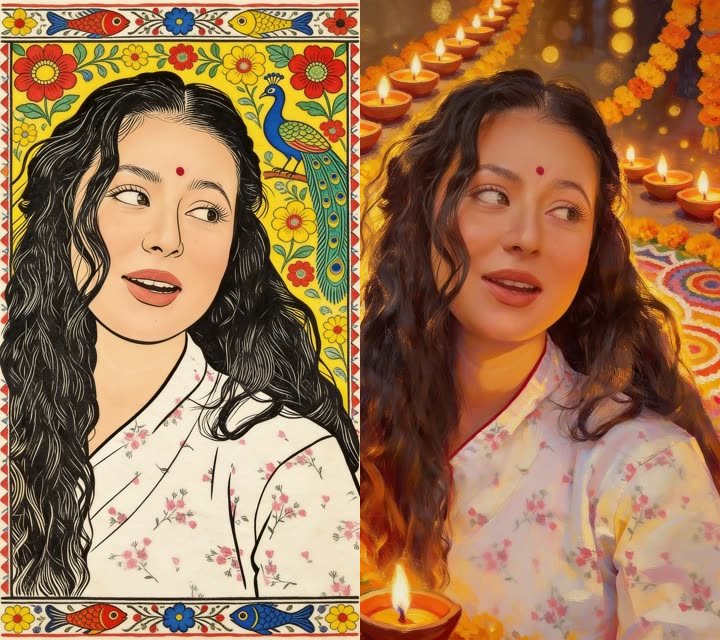
Two of the six AI painting looks are made for festivals. Madhubani turns your clip into folk art with bold lines and a patterned border. Diwali scene puts the same person among glowing lamps, marigold garlands and rangoli. Both are painted by AI every half second from your own video, with your sound kept.
Madhubani: folk art in motion
- Strong black outlines and flat colour, like the paintings made on walls and paper in Mithila.
- A border of fish, flowers and peacocks around the picture.
- A good fit for Raksha Bandhan, Chhath, weddings and any message to someone who loves folk art.
Diwali scene: a courtyard of light
- Warm golden light, rows of diyas and marigold garlands.
- Rangoli patterns and soft bokeh lights behind the person.
- A natural fit for a Diwali message, a Dhanteras wish or a Bhai Dooj clip.
How to make one
- Open Create, go to the Flipbook tab and tap Flipbook video.
- Pick a clip and choose Just the animation.
- In Look, tap Madhubani folk art or Diwali scene.
- Tap Make my video. It is 2 credits for every second, up to 60 seconds.
For a free option, put your clip inside a glowing festival greeting card. For planning, see the Diwali 2026 greeting plan.
Frequently asked questions
What is Madhubani art?
A folk art from the Mithila region of Bihar, known for bold outlines, flat colour and patterned borders with fish, flowers and birds.
Does the person still look like me?
The paintings are made from your own video's frames, so the person and what they do stay recognisable in the new look.
How much does a Diwali scene video cost?
2 credits for every second of video, up to 60 seconds. A 10 second clip is 20 credits.
Is there a free Diwali option?
Yes. The Greeting card template puts your clip inside a glowing Diwali card, free.
More articles
- Greet My Circle: Send Every Festival Wish in One Minute, in Everyone's Language
- AI Video Styles: 37 Looks From Realistic and Anime to Clay and Watercolour
- AI Video Prompt Builder: Write a Better Prompt for Any Video Tool
- Which AI Video Tool Should I Use? A Simple Guide to Every ShareGreet Video Maker
- Replace a Character in a Video With AI: Swap a Person for a Pet, Toy or Cartoon