
Greeting Card Video: Put Your Own Clip Inside a Diwali, New Year, Birthday, Christmas or Eid Card
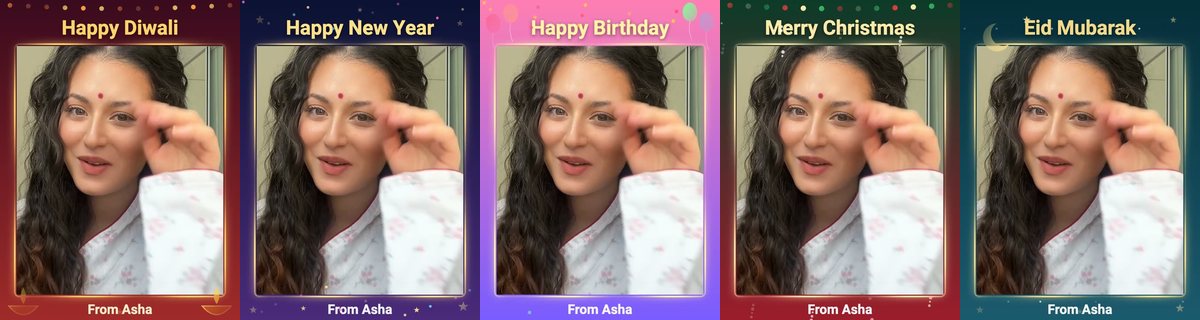
The new Greeting card template puts your own video inside a festival card: a glowing frame, twinkling lights, your wish on top and your name at the bottom. It is one of the free styled templates, so there is no AI wait and no credits.
Five cards, one for each occasion
- Diwali: deep red and gold, with small glowing lamps in the bottom corners.
- New Year: midnight blue and purple, with twinkling stars.
- Birthday: pink and violet, with balloons.
- Christmas: deep green and red, with twinkling lights.
- Eid: teal and gold, with a crescent moon.
How to make one
- Open Create. Greeting card is in the Quick tools row, and in the Templates tab.
- Tap Pick a video and choose a clip up to 30 seconds. It keeps its own sound.
- Choose the occasion. Type your own wish, or leave it empty for the usual one for that festival.
- Add From, your name, so the card is signed.
- Tap Make my video. It appears in your Profile, ready to share.
Ideas for each card
- A Diwali card with a 15 second clip of your family lighting the first lamp, sent to relatives who are far away.
- A New Year card with a short 'see you in the new year' message, in your own voice.
- A birthday card made from the birthday child's own clip, with the wish written in your language.
- A Christmas card from a clip of the tree, signed by the whole family.
- An Eid card with a clip of the festive table and a warm wish.
Planning festival greetings? See the Diwali 2026 greeting plan and WhatsApp greeting video tips.
Frequently asked questions
Is the Greeting card template free?
Yes. Styled templates use no AI and no credits. You can make up to ten styled-template and flipbook videos a day.
How long can my video be?
Up to 30 seconds. Your video keeps its own sound.
Can I write my own wish?
Yes. Type your wish, or leave it empty to get the usual wish for that festival. You can also sign it with your name.
Which festivals are there?
Diwali, New Year, Birthday, Christmas and Eid.
What size is the finished video?
720 by 960 pixels, which suits WhatsApp, Instagram and YouTube Shorts.
More articles
- Greet My Circle: Send Every Festival Wish in One Minute, in Everyone's Language
- AI Video Styles: 37 Looks From Realistic and Anime to Clay and Watercolour
- AI Video Prompt Builder: Write a Better Prompt for Any Video Tool
- Which AI Video Tool Should I Use? A Simple Guide to Every ShareGreet Video Maker
- Replace a Character in a Video With AI: Swap a Person for a Pet, Toy or Cartoon