
Rainbow Line: Give Any Video a Fine Rainbow Outline
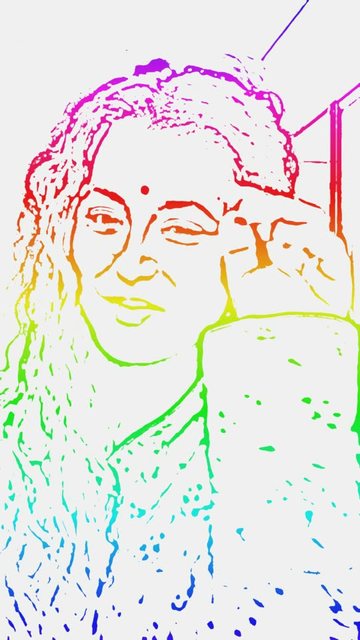
Rainbow line is a clean, bright look for any video of a person or character: you are lifted out of the clip and drawn with a thin rainbow outline, on a white background, in full height. It is a free styled template, so there are no credits and no AI wait.
Why it works
- It is easy to read. The white background and the fine colourful line keep all the attention on the person.
- It is full height (720 by 1280), the shape phones show best, so it fits Reels, Shorts and WhatsApp status.
- It keeps your sound, so a dance, a message or a song carries over exactly as filmed.
How to make one
- Open Create. Rainbow line is in the Quick tools row, and in the Templates tab.
- Tap Pick a video. Choose a clip of up to 15 seconds with one clear person or character.
- Tap Make my video.
What to know
- It takes longer than the other templates because every frame is drawn. A 6 second clip took about 4 minutes in our test, so pick the best 6 to 10 seconds of your video. You can close the app: it appears in your Profile when it is ready.
- It works best with one person and a clear view of them, not a crowd.
- Use videos you have the right to use. Your original video is deleted from our servers once the template is made.
More ways to restyle a clip: sketch, cartoon and flat vector cut-out flipbook videos.
Frequently asked questions
Is Rainbow line free?
Yes. It uses no AI and no credits. You can make up to ten styled-template and flipbook videos a day.
How long can my video be?
Up to 15 seconds, because every frame is drawn. The other templates take up to 30 seconds.
Why does it take a few minutes?
Each frame is traced separately to get a smooth, fine line. A 6 second clip took about 4 minutes in our test.
What works best?
A clip with one clear person or character. Crowds and very fast movement are harder to trace.
More articles
- Greet My Circle: Send Every Festival Wish in One Minute, in Everyone's Language
- AI Video Styles: 37 Looks From Realistic and Anime to Clay and Watercolour
- AI Video Prompt Builder: Write a Better Prompt for Any Video Tool
- Which AI Video Tool Should I Use? A Simple Guide to Every ShareGreet Video Maker
- Replace a Character in a Video With AI: Swap a Person for a Pet, Toy or Cartoon