
Styled Templates: Turn Any Video Into a Sticker, a Magazine Cover or a Neon Outline
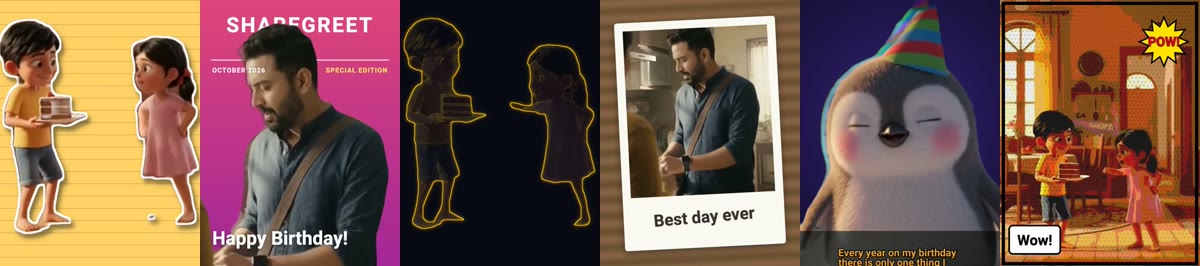
A styled template turns your own video into a ready-made look in a minute. Pick a video, pick a template, choose a colour, and share it. There is no AI to wait for and no credits to spend: templates are free.
The ten templates
- Sticker: a white die-cut border and a soft shadow, jiggling like stop-motion on a notebook page or a colour.
- Magazine cover: you in front of the magazine name, with your own headline and the month and year.
- Echo trail: coloured ghost copies follow every move. Great for dance.
- Neon outline: a glowing line around you on a dark stage. Choose rainbow, cyan, pink or green.
- Spotlight: you stay sharp and glowing while the room melts into a warm blur.
- Polaroid: an instant photo on a table, with your own handwritten-style caption.
- Comic panel: ink lines, dots and a POW burst, with your own speech caption.
- Pixel game: an 8-bit look with score, level and hearts, in colour or old green-screen.
- Retro tape: colour fringes, scan lines, REC and a date stamp, like an old home video.
- Duotone: a bold two-colour poster look in five colour pairs.
How to make one
- Open Create and tap Styled templates.
- Tap Pick a video and choose a clip. Tap any sample at the top to see what a template turns out like.
- Choose a template, then a background colour. Some templates also take a headline, a caption or a name.
- Tap Make my video. You can close the app: a tile marked Generating appears in your Profile, and we tell you when it is ready.
What works best
- For Sticker, Magazine cover, Echo trail, Neon outline and Spotlight the person is lifted out of the video, so one person or character with a clear view works best.
- Polaroid, Comic panel, Pixel game, Retro tape and Duotone use the whole picture, so any clip works.
- Videos up to 30 seconds. Your video keeps its own sound.
What to know
- Templates are free. You can make up to ten styled-template and flipbook videos a day in all.
- The finished video is 720 by 960 pixels and appears in your Profile, ready to share to Instagram, WhatsApp or YouTube Shorts.
- Your original video is deleted from our servers once the template is made.
- Use videos you have the right to use.
Frequently asked questions
Are styled templates free?
Yes. They use no AI model and no credits. You can make up to ten styled-template and flipbook videos a day.
How long can the video be?
Up to 30 seconds. Your video keeps its own sound.
Can I add my own words?
Yes, on some templates: a headline and magazine name on the magazine cover, a caption on the polaroid, a speech caption on the comic panel and a label on the pixel game.
Does it work with any video?
Yes. Five templates lift the person out of the video and work best with one clear person; the other five use the whole picture.
More articles
- Greet My Circle: Send Every Festival Wish in One Minute, in Everyone's Language
- AI Video Styles: 37 Looks From Realistic and Anime to Clay and Watercolour
- AI Video Prompt Builder: Write a Better Prompt for Any Video Tool
- Which AI Video Tool Should I Use? A Simple Guide to Every ShareGreet Video Maker
- Replace a Character in a Video With AI: Swap a Person for a Pet, Toy or Cartoon