
Record Your Own Voice on a Card or Flipbook

A generated voice can read your words. It cannot sound like you. For a grandmother who has not heard from you in a month, or a friend who misses your laugh, your own voice is the gift. Adding it to a card or a flipbook is free.
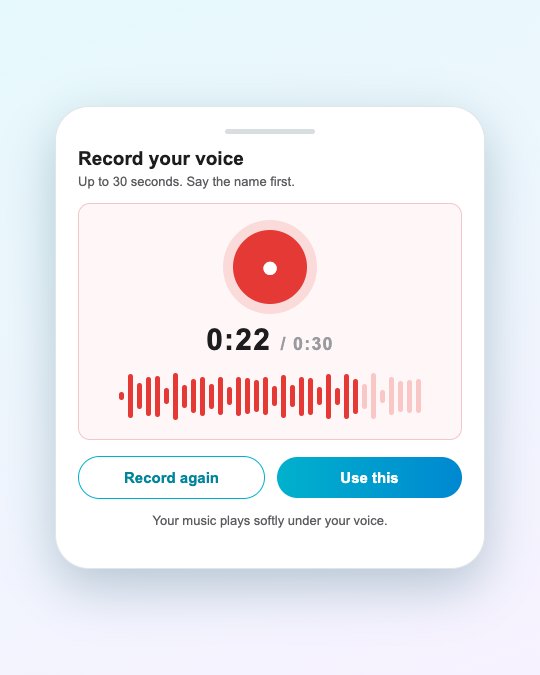
How to add it
- In the card or flipbook builder, scroll to Sound.
- Tap Your voice and then record. You can listen back and record again until you like it.
- Create the card or flipbook as usual. Your recording is played with it, with the music you chose kept softly underneath.
Recording works in the phone app and in the web app. On the web, your browser asks for permission to use the microphone the first time.
How long can it be?
- Card: up to 30 seconds. That is about 70 words, enough for a warm message.
- Flipbook: up to 60 seconds, which suits a short story across several pages.
Recording tips
- Find a quiet corner. A closed room beats a fan or a street.
- Hold the phone about a hand’s width away and speak across it, not into it.
- Smile as you speak. You can hear it.
- Say the name first. “Appa, happy birthday” gets attention in the first second.
- Do it in one or two takes. Slightly imperfect is warmer than perfect.
Your recording and your privacy
The recording is uploaded to make your card or flipbook and is then removed from the upload area. It stays private with your creation, and you can delete the creation at any time. More in sharing family photos and voices safely.
Your voice or an AI voice?
You can use one or the other. If you would rather not record, or you want the words read in a language you do not speak, see add an AI voice.
Frequently asked questions
Is recording my own voice free?
Yes. It does not use credits or free generations.
How long can my recording be?
Up to 30 seconds on a card and up to 60 seconds on a flipbook.
Can I use music as well?
Yes. The music you pick plays softly under your voice.
Can I record on the web app?
Yes. The browser asks for microphone permission the first time. On a phone, the app does the same.
More articles
- Greet My Circle: Send Every Festival Wish in One Minute, in Everyone's Language
- AI Video Styles: 37 Looks From Realistic and Anime to Clay and Watercolour
- AI Video Prompt Builder: Write a Better Prompt for Any Video Tool
- Which AI Video Tool Should I Use? A Simple Guide to Every ShareGreet Video Maker
- Replace a Character in a Video With AI: Swap a Person for a Pet, Toy or Cartoon