
Story Videos: Story Slideshow or Animated Video, and How to Choose
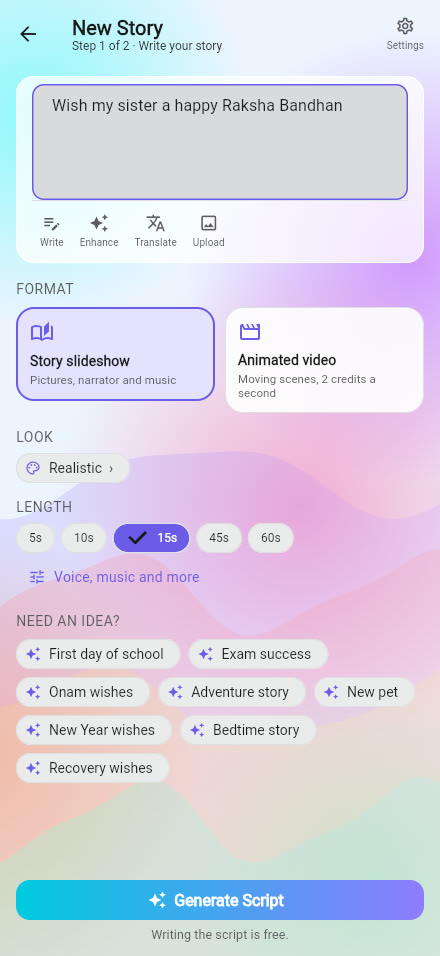
The Create tab now says Create a video, because every story you make ends as a video you can share. You choose how it should look and move: a Story slideshow or an Animated video.
The two formats
| Story slideshow | Animated video | |
|---|---|---|
| What you get | Pictures with a narrator and music | Scenes that really move |
| Cost | New accounts start with 5 free | About 2 credits for each second |
| Best for | Birthdays, festivals, thank-yous, family stories | A special moment you want to feel like a film |
| Length | 5, 10, 15, 45 or 60 seconds | 5, 10, 15, 45 or 60 seconds |
How it works
- Write what you want to say, or tap Write to get help. You can also press Enhance to make a rough idea clearer and Translate to change its language.
- Choose Story slideshow or Animated video.
- Pick a look, such as realistic, anime, watercolor, clay or comic, and a length.
- Tap Generate Script. Reading and editing the script is free.
- Make the video. Narration, captions and music are added for you.
In your language, with the right feeling
The narration follows the language of your story region, in over thirty languages. Under Voice, music and more you can choose a voice tone such as funny, serious, love or sad, so the narrator sounds like the message instead of a flat reading.
Story or message?
In the same options you can choose whether the script is told as a story, with characters and something happening, or as a message to someone, spoken straight to them like a card.
Which should you pick?
- Want it cheap, quick and personal? Choose the slideshow.
- Want a moment that moves, like a short film? Choose the animated video, and keep it short.
- Want your own photos or a video? A flipbook or a card is free and uses what you upload.
More about what costs credits is in credits and free generations explained.
Frequently asked questions
Is a story video free?
Your first stories are free: new accounts start with 5 free generations. Animated videos use credits, about two for each second.
Is writing the script free?
Yes. You read and edit the script before anything is made, and that step costs nothing.
Can I choose a voice for the narrator?
Yes. Pick a voice and a tone such as funny, serious, love or sad under Voice, music and more.
Which languages are supported?
Stories can be narrated in over thirty languages, following your story region.
More articles
- Greet My Circle: Send Every Festival Wish in One Minute, in Everyone's Language
- AI Video Styles: 37 Looks From Realistic and Anime to Clay and Watercolour
- AI Video Prompt Builder: Write a Better Prompt for Any Video Tool
- Which AI Video Tool Should I Use? A Simple Guide to Every ShareGreet Video Maker
- Replace a Character in a Video With AI: Swap a Person for a Pet, Toy or Cartoon