
Class Reunion Invitation: A Card With RSVP and a Guest List You Can Copy
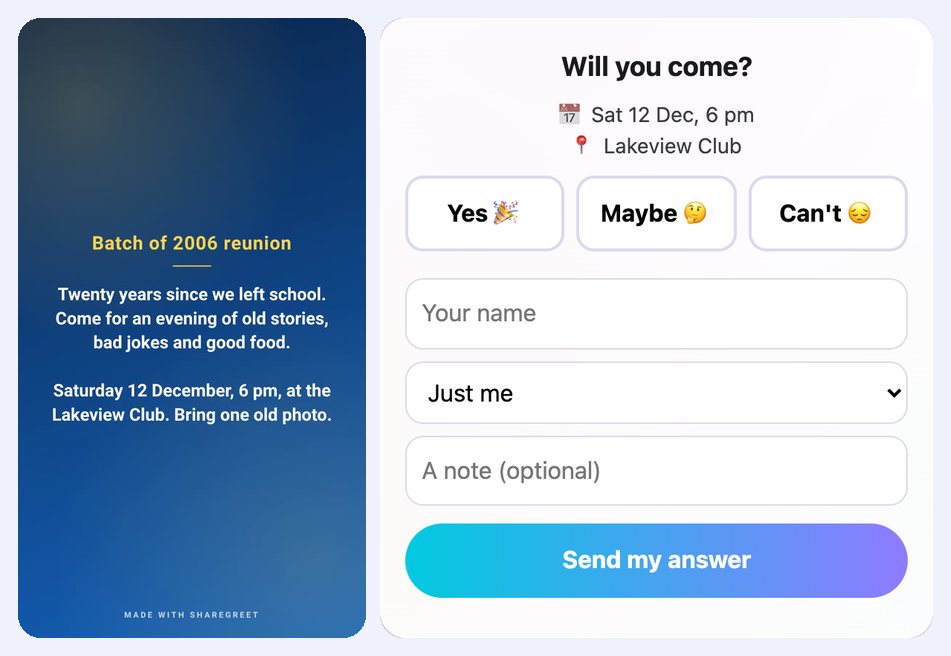
A reunion starts in a batch group with eighty members and ends with twelve thumbs-up and no idea who is really coming. The venue wants a number. A single invitation card with an RSVP gives you the number, and the names behind it.
Example: the batch of 2006
This is an example, not a customer story. Twenty years after school, a few friends want to organise an evening at a club on Saturday 12 December.
- Open the Create tab, choose Make a card and pick a calm theme such as Scholar.
- Write a title: Batch of 2006 reunion.
- Write the message: Twenty years since we left school. Come for an evening of old stories, bad jokes and good food. Saturday 12 December, 6 pm, at the Lakeview Club. Bring one old photo.
- Turn on Ask guests to RSVP. Add Sat 12 Dec, 6 pm and Lakeview Club.
- Make the card and post the link in the batch group.
What each person does
They open the link, see the card with the date and place, and tap Yes, Maybe or Can't. They type their name, choose how many people are coming, from 1 to 10, and can add a note: Coming with my wife, or Landing that morning from Pune.
What the organiser gets
Under Replies on the card there is a count of yes, maybe and can't, and the total number of people coming. Copy guest list puts the names into one text you can paste into a message to the venue or a shared note. It looks like this, with made-up names:
Coming (3): Asha (2), Vikram, Neha
Maybe (1): Rahul
Can't come (1): Sameer
A person who changes their mind answers again with the same name, and the new answer replaces the old one. The organiser also gets a notification for each answer.
A few practical points
- A card takes up to 60 answers in total, and a changed answer counts again. For a batch of two hundred, make one card per section or per house.
- Answers come to the person who made the card. Put one organiser's name on it, so everyone knows who is counting.
- If the place changes, edit it under Replies and save. People who open the link again see the new details.
Other occasions work the same way: wedding invitation wording, a housewarming or baby shower and a farewell for a friend moving away. Cards and RSVP use no AI and no credits.
Frequently asked questions
Can people answer without the app?
Yes. They answer on the card page in their browser.
How many people can answer one card?
Up to 60 answers in total. For a bigger batch, make several cards.
Can I see who is coming?
Yes. Replies shows the count and each name with their note, and Copy guest list gives you the names as text.
Can someone change their answer?
Yes. They answer again with the same name and it replaces the first answer.
Does it cost anything?
No. Cards and RSVP are free and use no credits.