
How to Restyle a Video With ShareGreet: Two Ways, Step by Step
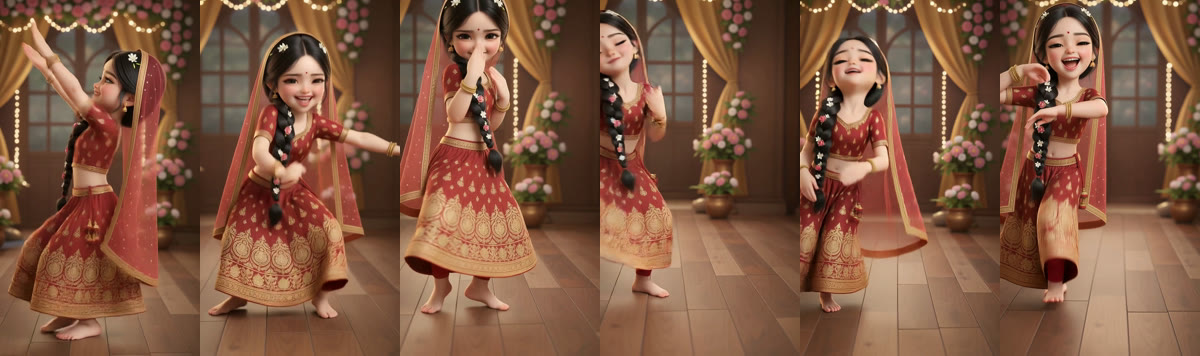
Restyle my video takes a short clip of yours, 3 to 15 seconds, and gives it a new life. There are two ways to use it: redraw the whole clip in a look you choose, or give your moves to a character, such as a doll-like girl, a boy in a kurta or a grandmother, and keep your own sound.
Way 1: Redraw my video
Everything in the clip becomes a drawing or a model in the look you pick, such as 3D, clay, watercolour, anime, pop art or pixel art. The moves, the timing, the camera and the room stay the same. People turn into drawn characters, never realistic ones.
- Open the + button and tap Restyle my video.
- Tap Choose a video and pick a clip of 3 to 15 seconds.
- Keep Redraw my video selected and pick a look. The row of samples shows what each one does.
- Add a short note if you like, such as "rainy evening".
- Confirm the video is yours and tap make. You can close the app: the video appears in your Profile, and we tell you when it is ready.
The sound is made to fit the scene. Speech from your clip is not carried over.
Way 2: Use my character
A character does your dance. The dancer's moves, hand gestures, expressions and mouth movements are copied onto the character, and your original sound stays, so a dance to a song is still a dance to that song.
- Open Restyle my video and choose your clip.
- Switch to Use my character.
- Pick one of the 37 ready characters or one you saved, or choose your own picture. Your own picture is checked to be family-friendly as soon as you choose it.
- Add a note if you like and confirm the video is yours.
- Tap make. This way takes 10 to 20 minutes, so leave the app and come back to your Profile.
The character keeps its own look, so there is no look to choose. If the picture does not show the whole character from head to feet, we make a whole-body version first. The face is matched closely, but not exactly.
Choose a clip that works
- One person, whole body in view, doing the moves.
- A steady camera and good light. A plain room helps.
- 3 to 15 seconds. A clip of 12 to 15 seconds is plenty for a full dance.
- A video you made or have the right to use.
Choose a character that works
- A whole-body picture with a clear face and arms away from the body is best.
- A made-up or drawn character is fine. A picture of a well-known real person is not accepted, nor is a picture of a child.
- For a character that says your words, use Talking wish instead.
What it costs and the limits
- 3 credits for every second of video, so a 15-second clip is 45 credits. Both ways cost the same.
- Credits come back if the video cannot be made.
- Up to eight restyles a day, and a few failed ones are forgiven each day before you need to wait for tomorrow.
- The free generations at the start apply to AI photo stories, not to Restyle. See what is free and what is credits.
- Your original clip is deleted from our servers once the new video is made.
Where to find the result
Open Profile. A tile marked Generating shows while it is being made, and a notification arrives when it is done. Tap the finished video to watch, save or share it to Instagram, WhatsApp or YouTube Shorts. If it fails, tap the tile to see why; your credits are returned.
Not a restyle? Try these
- Styled templates: ten free looks for any video, with no credits.
- Talking wish: a character says your line in your language.
Frequently asked questions
What is the difference between the two ways?
Redraw my video turns the whole clip into a new look, and its sound is made to fit. Use my character gives your moves to a character that keeps its own look, and your original sound stays.
How long does it take?
Redrawing takes a few minutes. Using a character takes 10 to 20 minutes. Either way you can close the app and come back to your Profile.
How much does it cost?
3 credits a second for both ways, so 45 credits for 15 seconds. Credits come back if the video cannot be made.
Will my own sound and song stay?
With a character, yes: your original sound is kept. When you redraw the whole clip, the sound is made to fit the scene and speech is not carried over.
Can I use my own picture as the character?
Yes. It goes through a family-friendly check when you choose it. Pictures of well-known real people and of children are not accepted.
Will the face look exactly like my character?
It is matched closely, not exactly. A clear whole-body picture with a large, sharp face gives the best result.
More articles
- Greet My Circle: Send Every Festival Wish in One Minute, in Everyone's Language
- AI Video Styles: 37 Looks From Realistic and Anime to Clay and Watercolour
- AI Video Prompt Builder: Write a Better Prompt for Any Video Tool
- Which AI Video Tool Should I Use? A Simple Guide to Every ShareGreet Video Maker
- Replace a Character in a Video With AI: Swap a Person for a Pet, Toy or Cartoon