
Print a Greeting Card at Home With a QR Code That Plays Your Video
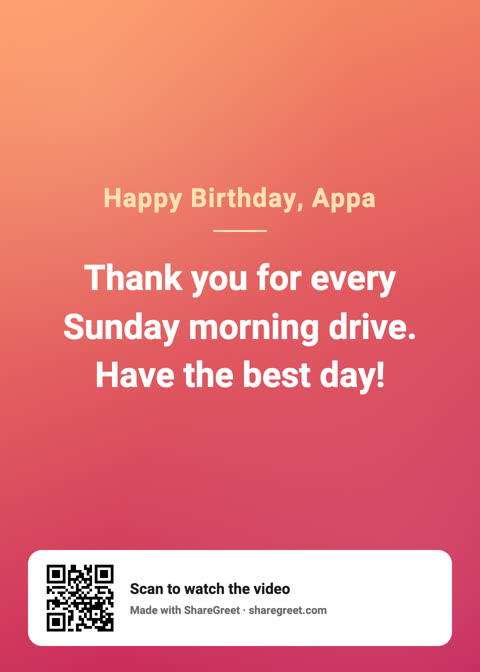
A message on a screen is easy to miss. A printed card sits on a shelf. ShareGreet cards and flipbooks can be printed at home, and each print has a QR code on it, so whoever holds the card can scan it and watch your video, or open your flipbook, on their phone.
What you get
- A 5×7 inch PDF for every card and flipbook you make from now on, with your message and theme laid out for print.
- On a card, a QR code at the bottom that opens the card's video.
- On a flipbook, one page per page of the book, with a QR code on the last page that opens the flipbook online.
Cards and flipbooks made before this feature was added do not have a print file. Make a new one and it will.
How to print it
- Open the card or flipbook from your profile and tap Print.
- Choose Print at home. The PDF opens in your phone's viewer or your browser.
- Print it, or save it and send it to a computer or a print shop. In the print dialog choose 5×7 in paper, or “fit to page” if your printer does not have that size.
Getting a good print
- Use heavier paper. Photo paper or light card stock makes it feel like a card, not a printout.
- Print in color at the best quality setting, and turn off any “ink saver” mode, which can wash out the QR code.
- Scan it before you give it. Point your own phone camera at the printed code and check that it opens the right card.
- Fold it in half if you want a greeting-card feel, or slip it in an envelope with a handwritten line on the back.
A few honest limits
The QR code opens a link, so it needs a signal or Wi-Fi on the phone that scans it. The link keeps working for as long as you keep the card in your account. If you delete the card, its link and QR code stop working. The photos are laid out for 5×7 and are the same resolution as the on-screen card, so very large prints will look soft.
Ideas
- Tuck a printed card into a gift, with the QR code leading to a video message for later.
- Put a printed flipbook on the table at a birthday or anniversary dinner.
- Mail a card to a relative who does not use messaging apps. The code does the rest.
New to the card maker? Start with the free card guide.
Frequently asked questions
Is printing free?
Yes. The print PDF is included with every new card and flipbook at no cost. You pay only for your own paper and ink, or a print shop's fee.
Can ShareGreet print and mail it for me?
Not yet. We are finding out whether people want that. If you tap “Have it mailed” in the Print menu, it counts as interest and nothing is ordered.
What size is the print?
5×7 inches, portrait.
More articles
- Greet My Circle: Send Every Festival Wish in One Minute, in Everyone's Language
- AI Video Styles: 37 Looks From Realistic and Anime to Clay and Watercolour
- AI Video Prompt Builder: Write a Better Prompt for Any Video Tool
- Which AI Video Tool Should I Use? A Simple Guide to Every ShareGreet Video Maker
- Replace a Character in a Video With AI: Swap a Person for a Pet, Toy or Cartoon