
10 Prompts for AI Story Greetings That Sound Like You
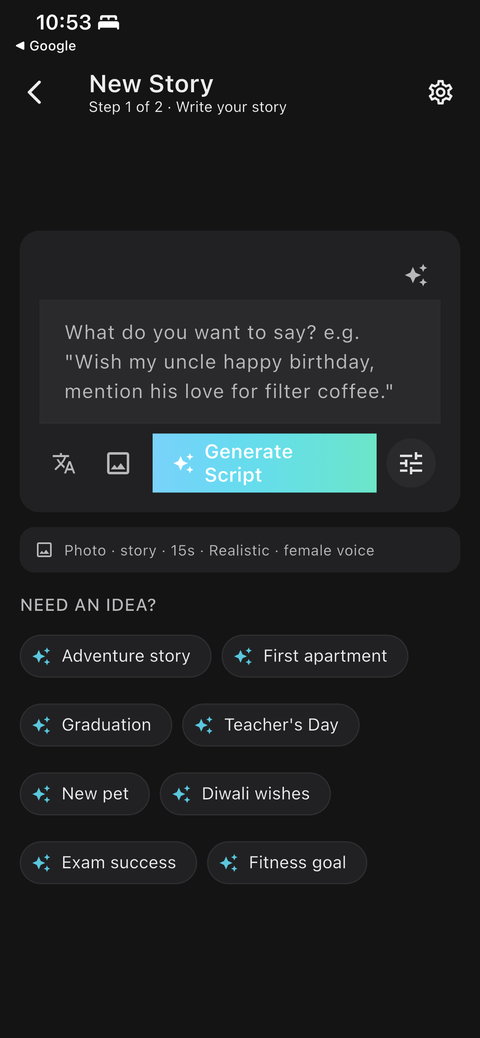
The quality of an AI greeting depends mostly on the prompt. The best prompts are short, specific and written the way you would say them to the person.
Three rules for a good prompt
- Name the person and relationship. “My grandmother” is better than “someone.”
- Include one concrete detail. A dish, a street, a habit.
- Say what you feel, in one sentence. Gratitude, missing them, pride.
Ten prompts to adapt
- Wish my uncle happy birthday and mention his love for filter coffee.
- Wish my parents happy anniversary and thank them for showing me what real love looks like.
- Send Diwali wishes to my cousin and remind her of the diyas we lit together as kids.
- Congratulate my niece on graduating college and tell her how proud the whole family is.
- Welcome my friend's newborn into the world and wish the baby a joyful, healthy life.
- Send get-well wishes to my uncle recovering from surgery and tell him everyone is rooting for him.
- Say goodbye to my roommate who is moving abroad and remind them to call home.
- Thank my teacher for believing in my writing when nobody else did.
- Tell my mother a short story about how her strength has shaped who I am.
- Wish my brother a happy Bhai Dooj and thank him for always being there.
How to improve a weak prompt
| Weak prompt | Stronger prompt |
|---|---|
| Wish my mom happy birthday | Wish my mom happy birthday. Mention her 6 a.m. chai and how she still calls me beta. |
| Congratulate my friend | Congratulate my friend on finishing her degree while working nights. Say she is the most determined person I know. |
| Thank my teacher | Thank my maths teacher who stayed after school to help me. Say I now teach maths to my own kids. |
Prompt length
One to three sentences is plenty. Long, rambling prompts tend to produce unfocused stories. If you have a lot to say, create two greetings instead of one.
Review before you generate
ShareGreet shows you the script before generating images and narration. This is the best moment to change the wording, remove a scene, or add your own photo. It is quicker to fix a line here than to regenerate.
Use Enhance if you are stuck
The sparkle icon on the New Story screen can expand a rough prompt into a richer one, and you can still edit the result. When you are ready, tap Generate Script and review each scene before generating. See how to make a birthday video message for your mom for a full walkthrough.
Frequently asked questions
Can I write the prompt in any language?
You can write in your own language and choose the narration language separately.
Can I edit the script?
Yes. You review and edit it scene by scene before generating.
More articles
- Greet My Circle: Send Every Festival Wish in One Minute, in Everyone's Language
- AI Video Styles: 37 Looks From Realistic and Anime to Clay and Watercolour
- AI Video Prompt Builder: Write a Better Prompt for Any Video Tool
- Which AI Video Tool Should I Use? A Simple Guide to Every ShareGreet Video Maker
- Replace a Character in a Video With AI: Swap a Person for a Pet, Toy or Cartoon