
Welcome a New Baby: A Pop-Up Card With a Cradle, and Baby Blue or Pink Photo Cards
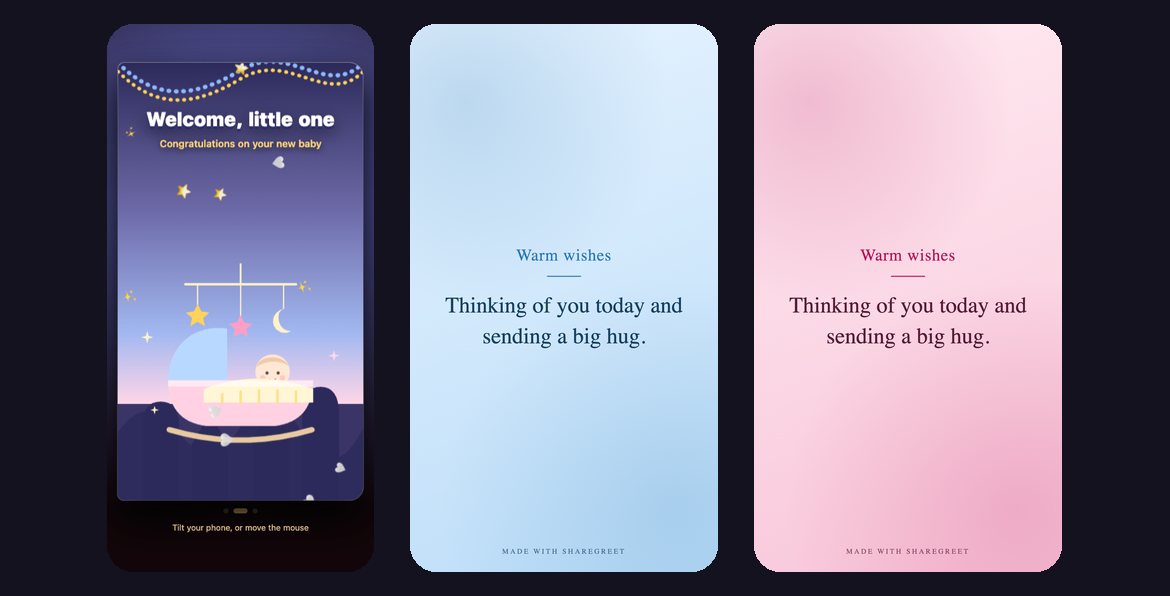
A new baby deserves a message that is soft and short. You can send one of two cards: a pop-up card that opens onto a sleeping baby in a cradle with a star and moon mobile, or a photo card in a baby blue or baby pink theme. Both are free.
Example: Sam welcomes his friends' new baby
This is an example, not a customer story. Sam's friends, Leah and Tom, have had a baby girl, and Sam wants to send a card the same day.
- Open the Create tab and choose Pop-up card.
- Pick the New baby card. It opens with Welcome, little one and Congratulations on your new baby.
- Type Leah and Tom under Who is it for? and his own name under From.
- Write: Welcome to the world, little one. Congratulations, you two. We cannot wait to meet her. Rest when you can, and we will bring food.
- Tap Make my card and send the link.
The photo card in blue or pink
If you have a photo, choose Make a card, pick the Baby blue or Baby pink theme, add the photo and write your message. Pick a layout such as Polaroid or Heart from the row that appears after you add a picture. Parents can make this card too, as a birth announcement to send to relatives.
Wording ideas
- Announcing it yourself: She is here! Meet Anaya, born on Tuesday morning. We are tired, happy and very much in love.
- From a friend: Congratulations on your beautiful baby. Wishing you sleep, patience and lots of cuddles.
- From grandparents: Welcome, little one. We have been waiting for you for a long time.
- From a coworker: Congratulations to you and your growing family. Take all the time you need.
Many more lines are in new baby congratulation messages. If you are organising a baby shower, invitation messages with RSVP covers the invitation.
A note on pictures of babies: the card page can be opened by anyone who has the link, so send it only to people you would show the photo to. See privacy tips for sharing family photos.
Frequently asked questions
Is the new baby card free?
Yes. Both the pop-up card and the photo card use no credits.
Can I add a photo to the pop-up card?
No, the pop-up card has a drawn scene. Use the plain card maker for a photo.
How do I get the blue or pink look?
In Make a card, choose the Baby blue or Baby pink theme.
Can I use it as a birth announcement?
Yes. Write the baby's name, birth date and a line or two, and send the link.
Can friends reply?
Yes. They can reply with an emoji, a voice note or a short video.