
Plan a Surprise Birthday With a Pop-Up Invitation and RSVP
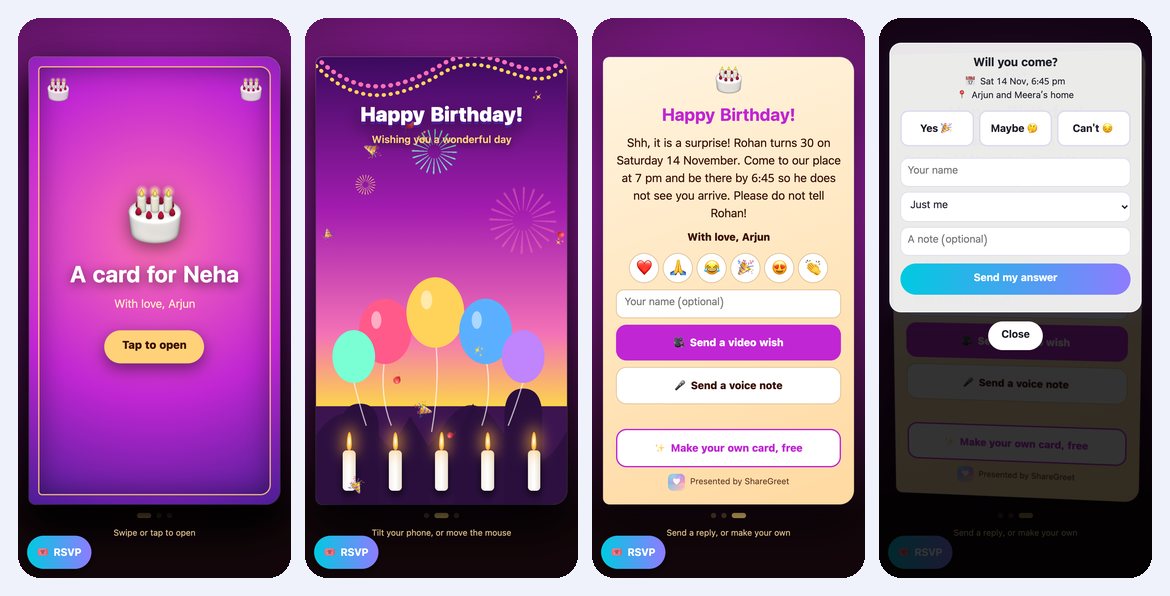
A surprise party has two hard parts: getting everyone there on time, and keeping the birthday person in the dark. A group chat makes both harder, because the person you are fooling is often in it. A pop-up card goes to each guest as a private link, and the answers come to you alone.
Example: Arjun plans a surprise for Rohan's 30th
This is an example, not a customer story. Arjun wants ten friends at his flat by 6:45 pm on Saturday 14 November. Rohan will arrive at 7.
- Open the Create tab and choose Pop-up card.
- Pick the Birthday card. (Choose Custom if you want your own headline and emoji.)
- Type the guest's name under Who is it for? and yours under From.
- Write the message. Arjun's: Shh, it is a surprise! Rohan turns 30 on Saturday 14 November. Come to our place at 7 pm and be there by 6:45 so he does not see you arrive. Please do not tell Rohan!
- Turn on Ask guests to RSVP and add Sat 14 Nov, 6:45 pm as the time and the address as the place.
- Make the card and send each guest their own link in a private chat.
What each guest does
They tap the link, tap the card and watch it open into a small animated scene. The message appears with the reply buttons under it. A round RSVP button in the corner opens the form: Yes, Maybe or Can't, their name, how many people are coming and an optional note such as I will bring the cake.
They do not need the app or an account.
What Arjun sees
- A notification for each answer, for example Neha: Yes, 2 people.
- The count of yes, maybe and can't, and how many people are coming, under Replies on the card.
- A Copy guest list button that gives him the names as plain text to paste into a note.
Keeping the surprise
- Send links privately. Answers go only to you, never to a group, so nobody can spoil it by replying in a chat Rohan can read.
- Put the early time in the message. Ask for 6:45 when he arrives at 7, as Arjun did.
- Collect video wishes. Guests can also send a short video wish or a voice note through the card, up to 15 seconds each. Arjun gets them under Replies and can play them at the party.
One card can hold up to 60 answers in total, and each change of mind counts as one. For a very big party, make a second card. You can make up to 15 cards a day, free. For the basics of the card itself, see how a pop-up card works, and for a plainer invitation, a free invitation card with RSVP.
Frequently asked questions
Will the birthday person see the invitation?
Only if you send the link to them. Each guest gets a private link, and the answers come to you alone.
Do guests need the app?
No. They open the link in their browser and answer on the card page.
Is a pop-up card free?
Yes. Pop-up cards and RSVP use no credits.
Can I change the time or place after sending?
Yes. Open the card's Replies screen, change the time or place and save. Guests see the new details.
How many answers can one card take?
Up to 60 in total. A guest who changes their answer counts again.
Can guests send a video wish too?
Yes. They can send a video wish of up to 15 seconds, a voice note or an emoji through the card.