
Wedding and Anniversary Cards: A Pop-Up Card With Rings, and Photo Cards in a Heart or a Frame
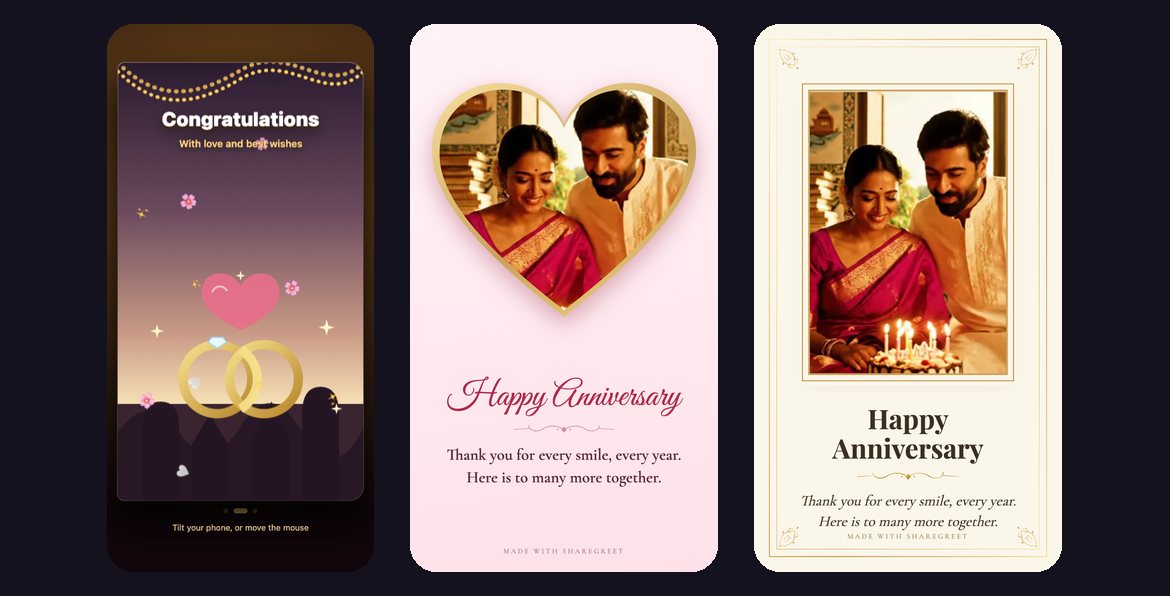
A wedding or an anniversary calls for two things: a card that feels like an occasion, and a picture. ShareGreet has both, and they are separate tools. The pop-up card opens onto two gold rings. The photo card puts your picture inside a heart or an ornate frame. You can send one or both.
Example: Priya sends congratulations to her cousin
This is an example, not a customer story. Priya's cousin Neel is getting married and she wants to send a card on the morning of the wedding.
The pop-up card
- Open the Create tab and choose Pop-up card.
- Pick the Wedding card. It opens with the word Congratulations and two interlocking gold rings.
- Type Neel and Anika under Who is it for? and her own name under From.
- Write the message: Congratulations to you both. May your life together be full of laughter, good food and a very long tomorrow. With all my love, Priya.
- Tap Make my card and send the link to the couple.
The photo card
- Choose Make a card and pick the Wedding theme, an ivory and gold look.
- Add one photo. Once a photo is added, a row of layouts appears.
- Choose Heart to place the picture in a heart with a gold edge, or Frame for an ivory card with a double gold line and corner ornaments. Film is a film-strip frame if you want something playful.
- Write the title and message, then tap Create card.
A layout takes one photo, the first one you add. For several photos, use a flipbook; see an anniversary flipbook with voice and music.
For an anniversary
The same two cards work. Use the Wedding pop-up and change the words, for example: Happy 25th anniversary. Thank you for every smile, every year. Here is to many more together.
- For parents: Happy anniversary, Mom and Dad. You showed us what a long and kind marriage looks like.
- For your partner: Another year, and I would still choose you. Happy anniversary.
- For friends: Congratulations on another year. You two are a joy to know.
More ideas are in anniversary wishes for parents. If you are inviting people to a wedding, wedding invitation wording and a pop-up card with RSVP can handle that.
Frequently asked questions
Is the wedding pop-up card free?
Yes. Pop-up cards and the photo card use no credits.
Can I use my own photo?
In the photo card, yes. The pop-up card has a drawn scene and no photo.
How many photos does a Heart or Frame layout take?
One, the first photo you add.
Does it work for an anniversary?
Yes. Use the same cards and write an anniversary message.
Do the couple need an app?
No. They open the link in their browser.