
AI Watercolour Video: Paint Your Clip Every Half Second
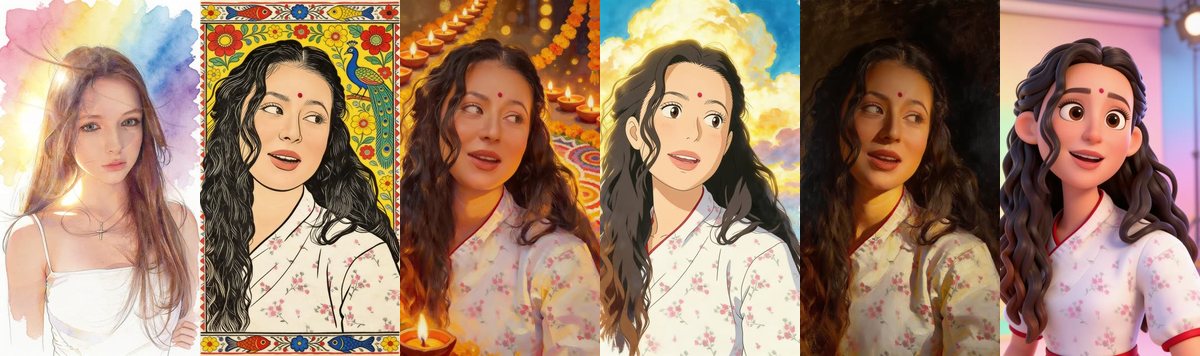
A new kind of look in Flipbook video: instead of a filter, an AI paints a new picture of your video every half second, and the paintings fade from one to the next. Your own sound plays over it, so it feels like a moving painting. There are six painting looks to choose from.
The six AI looks
- Watercolour painting: pale washes of colour, soft edges and white paper.
- Madhubani folk art: bold outlines and a patterned folk-art border, like the paintings of Bihar. See Madhubani and Diwali scene videos.
- Diwali scene: the same person among glowing lamps, marigolds and rangoli.
- Anime film: a hand-painted film look with big skies. See anime, oil painting and 3D cartoon.
- Oil painting: rich, dark colours and visible brushwork.
- 3D cartoon: a smooth animated-movie character look.
How to make one
- Open Create, go to the Flipbook tab and tap Flipbook video.
- Tap Pick a video, then choose Just the animation.
- In Look, pick one of the AI looks. Each tile shows a sample.
- Tap Make my video. You see the price first.
What it costs
2 credits for every second of video, up to 60 seconds. A 10 second clip is 20 credits. If you only want a quick taste, a short clip is the cheapest way to try a look.
What to know
- The pictures are painted from your video's own frames, so the person and the scene stay recognisable.
- The video is made in the background. A tile marked Generating appears in your Profile.
- The AI looks are in Just the animation. For the free flipbook-in-a-hand looks, see Turn any video into a hand-held flipbook.
- Clips that are not family-friendly are not painted, and credits are returned if a video cannot be made.
Frequently asked questions
How is it different from the other flipbook looks?
The other looks are free filters drawn on your video. The AI looks use an AI model to paint a new picture every half second, so they cost credits.
How much does it cost?
2 credits for every second of video, up to 60 seconds. You see the price before you start.
Does my video keep its sound?
Yes. Your own sound plays over the painted video.
Which AI looks are there?
Watercolour, Madhubani, Diwali scene, anime film, oil painting and 3D cartoon.
Do I get my credits back if it fails?
Yes. If a video cannot be made, the credits are returned.
More articles
- Greet My Circle: Send Every Festival Wish in One Minute, in Everyone's Language
- AI Video Styles: 37 Looks From Realistic and Anime to Clay and Watercolour
- AI Video Prompt Builder: Write a Better Prompt for Any Video Tool
- Which AI Video Tool Should I Use? A Simple Guide to Every ShareGreet Video Maker
- Replace a Character in a Video With AI: Swap a Person for a Pet, Toy or Cartoon