
Replace a Person With Your Pet or a Character in Your Own Video
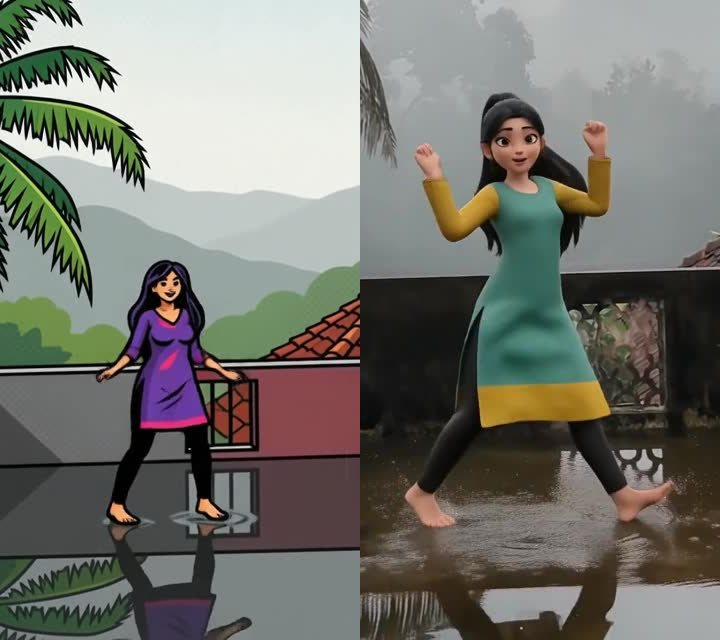
With Replace anyone or anything you keep your own video, with its room, its moves and its sound, and swap the person in it for something else from a picture. That can be a made-up character, a toy, a person you have the right to use, or now, your pet or any animal.
The pictures above are samples from Make my video dance, the sister tool, which redraws the person in a chosen look. Replace works the same way, with a character you choose instead of a look.
What you can swap in
- Your pet or any animal: a dog, a cat, a parrot, a cartoon animal.
- A made-up or cartoon character from a picture.
- A toy or an object with a clear shape.
- A person, if the picture is yours or you have the right to use it.
How to make one
- Open Create, go to the AI Video tab and tap Replace anyone or anything.
- Pick your video: 3 to 15 seconds, with one clear subject who moves.
- Choose the picture of what goes in. A full picture, clearly showing the character from head to feet or paws, gives the best result.
- Confirm that the video and the picture are yours or that you have the right to use them, then tap Make.
What to know
- It costs 3 credits for every second. A 15 second video is 45 credits.
- It takes about 10 to 15 minutes. You can close the app: a tile marked Generating appears in your Profile.
- Videos longer than 15 seconds are refused with a message, so trim first.
- Pictures that are not family-friendly, photos of children and well-known real people are refused.
- If a video cannot be made, your credits come back.
Step-by-step help for both tools: how to restyle a video, two ways, and make a character dance with your moves. Open Replace anyone or anything to try it.
Frequently asked questions
Can I replace a person with my dog or cat?
Yes. Animals, pets and cartoon characters work, as well as made-up characters and people you have the right to use.
How long can the video be?
Between 3 and 15 seconds.
How much does it cost?
3 credits for every second, so a 15 second video is 45 credits. You see the price before you start.
Does the sound stay?
Yes. The original sound of your video is kept.
How long does it take?
About 10 to 15 minutes. It runs in the background and appears in your Profile.
More articles
- Greet My Circle: Send Every Festival Wish in One Minute, in Everyone's Language
- AI Video Styles: 37 Looks From Realistic and Anime to Clay and Watercolour
- AI Video Prompt Builder: Write a Better Prompt for Any Video Tool
- Which AI Video Tool Should I Use? A Simple Guide to Every ShareGreet Video Maker
- Replace a Character in a Video With AI: Swap a Person for a Pet, Toy or Cartoon